| Author | Thread |
|
|
06/07/2006 02:40:53 PM · #26 |
|
at home: iMac 17" Wide Screen; at work: the gorgeous 24" Apple HD Wide Screen. |
|
|
|
06/07/2006 02:46:00 PM · #27 |
22 inch LaCie Electron Blue here. Fine monitor... Running at 1600x1200...
R.
|
|
|
|
06/07/2006 04:20:52 PM · #28 |
Dell 20.5" Widescreen LCD connected to my Mac in some sort of unholy alliance.
1680x1050 |
|
|
|
06/07/2006 04:26:07 PM · #29 |
21" flat panel wide screen. Also running at 1600x1200.
Message edited by author 2006-06-07 16:26:20. |
|
|
|
06/07/2006 04:35:59 PM · #30 |
|
17" laptop LCD... 1920x1200 |
|
|
|
06/07/2006 05:18:05 PM · #31 |
24" Dell LCD Widescreen for the desktop ... Love it!
17" widescreen on the Laptop
Edit - had to throw in a pic of the setup. :)
>>> CLICKY <<<
Message edited by author 2006-06-07 19:57:19. |
|
|
|
06/07/2006 05:35:52 PM · #32 |
|
2 19" NEC LCD's @ 1600x1200 With Monaco Optix calibration unit! |
|
|
|
06/07/2006 05:38:06 PM · #33 |
Originally posted by Louis:
Originally posted by DanSig:
screen envy is useless... unless you know someone with a setup like this
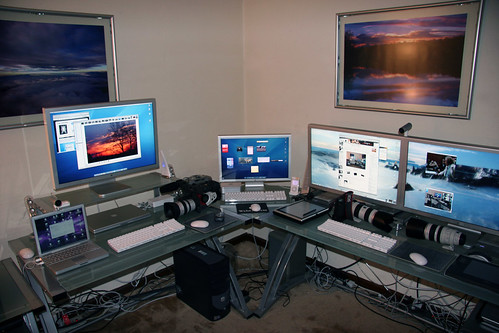
I use the 23" apple Cinema display an I love it... |
The wire management sucks. :P |
That is the first thing I noticed. Maybe I like my desk a little too neat.
|
|
|
|
06/07/2006 06:00:57 PM · #34 |

Formac Raven 2010 (1600x1200), Mitsu 930SB (1600x1200), Sony 17" Trinitron (1024x768) - all from 1 PC, 14" Laptop (1400x1050)
the most widely used resolution on the web is 1024x768 @ 57% - so pics sized @ 800x533 is a good size :) and 81% are 24bit colour
Message edited by author 2006-06-07 18:10:36. |
|
|
|
06/07/2006 07:27:54 PM · #35 |
Originally posted by Bobster:
... the most widely used resolution on the web is 1024x768 @ 57% - so pics sized @ 800x533 is a good size :) and 81% are 24bit colour |
For those that don't already know there is some confusion about 8-bit and 24-bit color. For all practical purposes 8-bit and 24-bit color are one and the same and the terms are used interchangeably.
8-bit color has 255 different shades that can be displayed per pixel. Since most people work with RGB (Red, Green and Blue) images it is called 24-bit color because there are 8-bits in each of the three RGB channels and they are added together to make 24. CMYK in 8-bit color is described as 32-bit because it has 4 channels with 8-bits each.
But if you move up to 16-bit color(2 to the 16th power shades!) from 8-bit then RGB is said to be 48-bit color since there are 16-bits for each of the three RGB channels. Of course, CMYK becomes 64-bit color.
It is just easier to think of 8-bit and 16-bit only. Advertisers like to use the bigger numbers. .jpeg compression only supports 8-bit color which is why 81% of all web images are 8-bit (Uh, I mean 24-bit RGB or 32-bit CMYK) color. LOL!
|
|
|
|
06/07/2006 08:39:35 PM · #36 |
I run 1152x864 on a 19inch FlatScreen CRT..
After reading this thread I seen alot of people are running 1280x1024, so I thought I try that res.
Well it really affected "ratio" I see the pics, on my usuall res. the pics are taller and skinnier, at 1280 much more boxy.
The thing is I PP my pics using 1152, obsiouvly and thats the look I wanted, but when people view them @ 1280, this is not the way I envisioned them..
This make any sense??
|
|
|
|
06/07/2006 09:19:00 PM · #37 |
Originally posted by buzzrock:
I run 1152x864 on a 19inch FlatScreen CRT..
After reading this thread I seen alot of people are running 1280x1024, so I thought I try that res.
Well it really affected "ratio" I see the pics, on my usuall res. the pics are taller and skinnier, at 1280 much more boxy.
The thing is I PP my pics using 1152, obsiouvly and thats the look I wanted, but when people view them @ 1280, this is not the way I envisioned them..
This make any sense?? |
You're running afoul of aspect ratio. If your screen has an aspect ratio of 4x5 and you set the resolution to an aspect ratio of 4x6, you're gonna get distortion as it squeezes everything in from the sides a little bit. Not all "resolutions" are usable by all monitors. Now that we have skinny ("wide format) monitors, we have a whole slew of resolutions which distort images if they are loaded onto a monitor of conventional aspect ratio.
Robt.
|
|
|
|
06/07/2006 09:22:57 PM · #38 |
I got a dell xps 600 with a 24in wide screen
|
|
|
|
06/07/2006 09:25:18 PM · #39 |
I've got 3 monitors used for browsing and voting.
2.5" LCD with 640x480 pixels
19" LCD with 1280x1024 pixels
21" CRT monitor |
|
|
|
06/07/2006 09:47:18 PM · #40 |
I think a good test is to load up the "Square crop" challenge and get out a ruler--
Using 1152x864, the pics are almost completly square..
When I use 1280x1024, the pics are always wider, even when I try to adjust my monitor to make them square, I cant get it right-- mostly empty black space on the left on right sides,
|
|
|
|
06/07/2006 10:16:54 PM · #41 |
Originally posted by buzzrock:
I think a good test is to load up the "Square crop" challenge and get out a ruler--
Using 1152x864, the pics are almost completly square..
When I use 1280x1024, the pics are always wider, even when I try to adjust my monitor to make them square, I cant get it right-- mostly empty black space on the left on right sides, |
Most CRT's (except the SONY and HP 24") have a 4:3 aspect ratio like the older analog television sets and they'll use the "traditional" resolutions of 800x600, 1024x768, 1280x 960, 1600x1200, etc. All of these will reduce down to a 4:3 aspect ratio (as does 1152x864). Obviously, the new LCD's aren't so standardized in their aspect ratios and you need to make sure what aspect ratio your screen is to choose the appropriate resolution to avoid distortion. For instance, 1280x1024 is a 5:4 aspect ratio. My 24" CRT has a 16:10 aspect ratio and I think that's also what most of the widescreen LCD's and HDTV's run as well.
Message edited by author 2006-06-07 22:18:32. |
|
|
|
06/07/2006 10:45:37 PM · #42 |
HP NW8000 15in UXGA laptop monitor running at 1600x1200. Upgrading to a WUXGA 15.4in widescreen laptop monitor in the fall with 1920x1200 (getting new laptop). I envy all of you with these massive monitors though, it would be really nice to have one of those. But, getting a DSLR is more important than that at the time, this monitor is more than good enough for my purposes.
Message edited by author 2006-06-07 22:58:04.
|
|
|
|
06/08/2006 04:18:26 PM · #43 |
Originally posted by stdavidson:
It is just easier to think of 8-bit and 16-bit only. Advertisers like to use the bigger numbers. .jpeg compression only supports 8-bit color which is why 81% of all web images are 8-bit (Uh, I mean 24-bit RGB or 32-bit CMYK) color. LOL! |
i think you're the one who is confused!
CMYK isn't 32bit - there are more colours in 24bit RGB (16.6 million) than in CMYK (14K) ..
32bit is for 3D games/work - 24bits for Colour and 8bits for Alpha channel (transparancy)
most PC's will display 8,16 and 24bit colour - 8bit = 256 colours, 16bit = 65K colours and 24bit = 16mil colours
older PC's displayed 1,2 and 4bit |
|
Home -
Challenges -
Community -
League -
Photos -
Cameras -
Lenses -
Learn -
Help -
Terms of Use -
Privacy -
Top ^
DPChallenge, and website content and design, Copyright © 2001-2026 Challenging Technologies, LLC.
All digital photo copyrights belong to the photographers and may not be used without permission.
Current Server Time: 05/17/2026 09:52:15 PM EDT.




