| Image |
Comment |
| 04/15/2020 01:09:21 PM |
|
| 08/10/2016 01:45:31 PM |
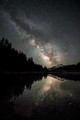
Mt.-Bachelor-reflected-in-Todd-Lakeby SchoComment: Originally posted by tate:
a crowd pleaser - no doubt. Can't wait to see the settings / method on this one. Very nice. |
Thank you for your nice comments. You requested an explanation of how this was created, here it is: The camera settings were f/2.8, 25 seconds with ISO of 2500. I copied the raw image into Lightroom (LR). I made a virtual copy of the image and used the Basic Panel in LR to process one copy to optimize the sky and the other copy to optimize the foreground and Lake. I then took both copies into Photoshop (PS) as layers and using a luminosity mask, blended the two copies together to utilize the sky from one and the foreground from the other. I then used 2 different lights luminosity masks to lighten the Milky Way; a lights luminosity mask to lighten the mountain; and a lights luminosity mask to slightly darken the reflection; a used a curves adjustment to lighten the image, covered it with a black mask and painted in those portions of the Milky Way that I wanted to lighten further; I used a rough selection of the mountain and lightened with a curves adjustment; I used a darks luminosity mask to darken portions of the sky and reflection; I used one color balance layer; I used Nik Color Efex Pro (Darken/Lighten Center) to create a slight vignette; I finished by merging all layers into one (Cmd/Option/Shift/e), performed noise reduction on that layer with the Imagemonic Noise Reduction Plug-in and then used a luminosity mask to apply the noise reduction only to the darkest parts of the image. Thats probably more than you want to know - but there it is. Feel free to follow-up with any questions that you might have. |
| 08/08/2016 12:27:04 PM |
Mt.-Bachelor-reflected-in-Todd-Lakeby SchoComment: Thank you for your nice comments. For those who requested an explanation of how this was created, here it is: The camera settings were f/2.8, 25 seconds with ISO of 2500. I copied the raw image into Lightroom (LR). I made a virtual copy of the image and used the Basic Panel in LR to process one copy to optimize the sky and the other copy to optimize the foreground and Lake. I then took both copies into Photoshop (PS) as layers and using a luminosity mask, blended the two copies together to utilize the sky from one and the foreground from the other. I then used 2 different lights luminosity masks to lighten the Milky Way; a lights luminosity mask to lighten the mountain; and a lights luminosity mask to slightly darken the reflection; a used a curves adjustment to lighten the image, covered it with a black mask and painted in those portions of the Milky Way that I wanted to lighten further; I used a rough selection of the mountain and lightened with a curves adjustment; I used a darks luminosity mask to darken portions of the sky and reflection; I used one color balance layer; I used Nik Color Efex Pro (Darken/Lighten Center) to create a slight vignette; I finished by merging all layers into one (Cmd/Option/Shift/e), performed noise reduction on that layer with the Imagemonic Noise Reduction Plug-in and then used a luminosity mask to apply the noise reduction only to the darkest parts of the image. Thats probably more than you want to know - but there it is. Feel free to follow-up with any questions that you might have. |
| 08/01/2016 03:11:29 PM |
|
 Photographer found comment helpful. |
| 12/16/2015 11:17:48 AM |
Bad Dream by Bear_MusicComment: Robt-
Congratulations on the Blue. Thankfully my dentist doesn't look like that or I'd never go. Say hi to Penny.
Glen |
| Photographer found comment helpful. |
| 11/12/2015 11:58:11 AM |
|
| 11/12/2015 11:56:33 AM |
|
| 11/12/2015 11:54:36 AM |
Clearing Storm, Aspens, Dunderberg Meadow, Eastern Sierraby SchoComment: Originally posted by ArnaMarie:
This is a very powerful image in my view. I liked it even better on second look and bumped you up to a 9. Love the dramatic clouds against the golden tree line. My eyes wonder around the image and is constantly met by interesting elements. I wish this was my entry :) Best of luck! |
Thank you very much for your nice comments. This was my first entry ever in a DPChallenge. Your comments will encourage me to continue to participate. |