DPChallenge: A Digital Photography Contest You are not logged in. (log in or register
 
Browse Settings
Currently viewing:
Registered Userbobonacus

Show comments:

Per page:

Order:

Comments:


Comments Made by bobonacus
Pages:   ... [179] [180] [181] [182] [183] [184] [185] ... [478]
Showing 1811 - 1820 of ~4773
Image Comment
October
02/26/2009 01:44:26 PM
October
by h2

Comment:
lovely colours and the vignette really sets it off
Photographer found comment helpful.
January
02/26/2009 01:44:02 PM
January
by drake217

Comment:
the editing is pushed a little too far for my tastes
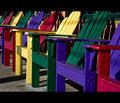
June
02/26/2009 01:43:16 PM
June
by smichener

Comment:
great colours, not keen on the tops being cut off though
Photographer found comment helpful.
Pieces of ME?!
02/25/2009 09:26:15 AM
Pieces of ME?!
by Lonni

Comment:
This is so awesome, fantastic setup
Photographer found comment helpful.
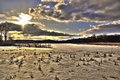
My backyard
02/23/2009 06:19:17 AM
My backyard
by GiorgioBaruffi

Comment:
Nice peaceful scene, love the colour of the sky, not so keen on the streetlights(?) but not much you can do about that!
Photographer found comment helpful.
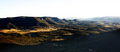
Blue-Mountains.jpg
02/23/2009 06:13:10 AM
Blue-Mountains.jpg
by Covert_Oddity

Comment:
Looks like a great view, have to agree with the others regarding the exposure .... I put together a little how to for one of ssocrates shots which may be useful in this case How to blend 2 exposures
Photographer found comment helpful.
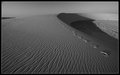
January
02/23/2009 06:07:06 AM
January
by gys

Comment:
This is cool, the footsteps really add so much to this shot.
Photographer found comment helpful.
DSCF4047.jpg
02/22/2009 09:56:29 AM
DSCF4047.jpg
by ikopanas

Comment:
This is a quick How To to blend 2 different exposure images together :)

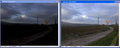
We have two images that have been edited differently to expose a sky and a much brighter land.
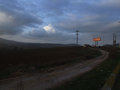

Open your images


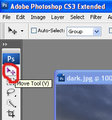
Choose the move tool


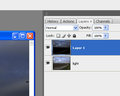
and then whilst holding the shift key drag the dark image onto the light image. Holding the shift key centers the dragged image, in this case they will be perfectly aligned and you end up with two layers.


From the bottom of the layers palette add a layer mask


The choose black as your default colour, press D (and maybe X to swap white and black) choose a soft brush, in this case I choose a 100 px with a hardness of 0% and 100% opacity and then paint on your mask


The layer underneath will then be revealed. Painting black on the layer mask will hide the image on that layer. You can swap back to white to add back in if you go too far, you'll end up with this.


Make sure you are clicked on your layer mask before you start painting. You can just show the layer mask by holding Alt down before clicking it.


I also added a curves layer and copied the layer mask to only apply that to the sky.

You'll then end up with your final image

Photographer found comment helpful.
ssoc4050tripolis.jpg
02/22/2009 09:53:00 AM
ssoc4050tripolis.jpg
by ikopanas

Comment:
This is a quick How To to blend 2 different exposure images together :)

We have two images that have been edited differently to expose a sky and a much brighter land.
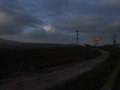

Open your images


Choose the move tool


and then whilst holding the shift key drag the dark image onto the light image. Holding the shift key centers the dragged image, in this case they will be perfectly aligned and you end up with two layers.


From the bottom of the layers palette add a layer mask



The choose black as your default colour, press D (and maybe X to swap white and black) choose a soft brush, in this case I choose a 100 px with a hardness of 0% and 100% opacity and then paint on your mask
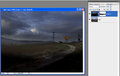


The layer underneath will then be revealed. Painting black on the layer mask will hide the image on that layer. You can swap back to white to add back in if you go too far, you'll end up with this.
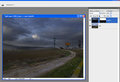


Make sure you are clicked on your layer mask before you start painting. You can just show the layer mask by holding Alt down before clicking it.
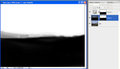


I also added a curves layer and copied the layer mask to only apply that to the sky.

You'll then end up with your final image

Photographer found comment helpful.
ssoc4050tripolis.jpg
02/19/2009 07:35:10 AM
ssoc4050tripolis.jpg
by ikopanas

Comment:
I prefer the brightness of the land in this but preferred the wider crop and sky of the previous edit.

If you are using photoshop you could blend the two together using layer masks, or you could apply a gradient fill layer in soft ligth mode to darken the sky back down again. Drop me a pm if you want more info and I'll add it.
Photographer found comment helpful.
Pages:   ... [179] [180] [181] [182] [183] [184] [185] ... [478]
Showing 1811 - 1820 of ~4773


Home - Challenges - Community - League - Photos - Cameras - Lenses - Learn - Help - Terms of Use - Privacy - Top ^
DPChallenge, and website content and design, Copyright © 2001-2026 Challenging Technologies, LLC.
All digital photo copyrights belong to the photographers and may not be used without permission.
Current Server Time: 07/27/2026 11:06:20 AM EDT.